

Infrastructure teams don’t have a shortage of automation anymore. They have a shortage of orchestration, which still needs human and manual steps.
Give me a few minutes, and you will know what I mean.
A few weeks ago, a developer messaged me on Slack: “Can you set up a new microservice for me?”
I asked him to send me a ServiceNow ticket.
It sounded like one task, but it was never the “one task”.
Create a GitHub repository.
Provision an EC2 instance.
Stand up a PostgreSQL database.
Run Terraform.
Wait for AWS to make those resources available, which takes as long as it takes.
Configure the server with Ansible.
Confirm back on Slack and close the ServiceNow ticket.
None of those steps were difficult. Every single one of them was already automated.
Terraform handled the infrastructure. Ansible configured the server. The GitHub API created the repo. The AWS CLI took care of the cloud resources.
The problem was never automation. The annoying part was everything in between.
- What runs first?
- What happens if Terraform succeeds but Ansible fails?
- Who approves production changes?
- How do you retry one failed step without running all of them again?
And three weeks later, when someone asks why a deployment failed, how do you answer?
Those aren’t automation problems. They’re orchestration problems, and almost every platform team runs into them eventually.
We all spent years adding good tools in our workflow. Terraform, Ansible, GitHub Actions, Python scripts, shell scripts, Jenkins, cron. Each one solves its problem well.
You’re running dozens of automations across different systems. But nobody owns the sequence.
Some fire from Jenkins, some from a legacy scheduler, and others live as a Python script triggered from GitHub Actions.
The missing piece isn’t another automation tool. It’s a control plane that can orchestrate the ones you already have, from one place, as workflow-as-code.
Terraform, Ansible, GitHub, ServiceNow, your own APIs, your cron jobs. One engine that owns the sequence, and records every run so you can see what happened later.
This is exactly where workflow orchestrators like Kestra fit in.
Kestra is an open-source, self-hosted orchestration platform that lets you standardize Terraform, Ansible, CI/CD, and operational workflows in one control plane. Workflows are defined declaratively in YAML, versioned in Git, and every execution is tracked with logs, approvals, retries, and audit trails.
Instead of replacing Terraform, Ansible, GitHub, or your existing Bash and Python scripts, Kestra becomes the layer that coordinates them.
Rather than talking about orchestration, let’s actually use it.
We’ll build a real platform engineering workflow with Kestra that you can copy, paste, and adapt for your own environment.
What we are building
We’ll build a small internal platform workflow.
Nothing fancy, just a real workflow that most platform teams run every day.
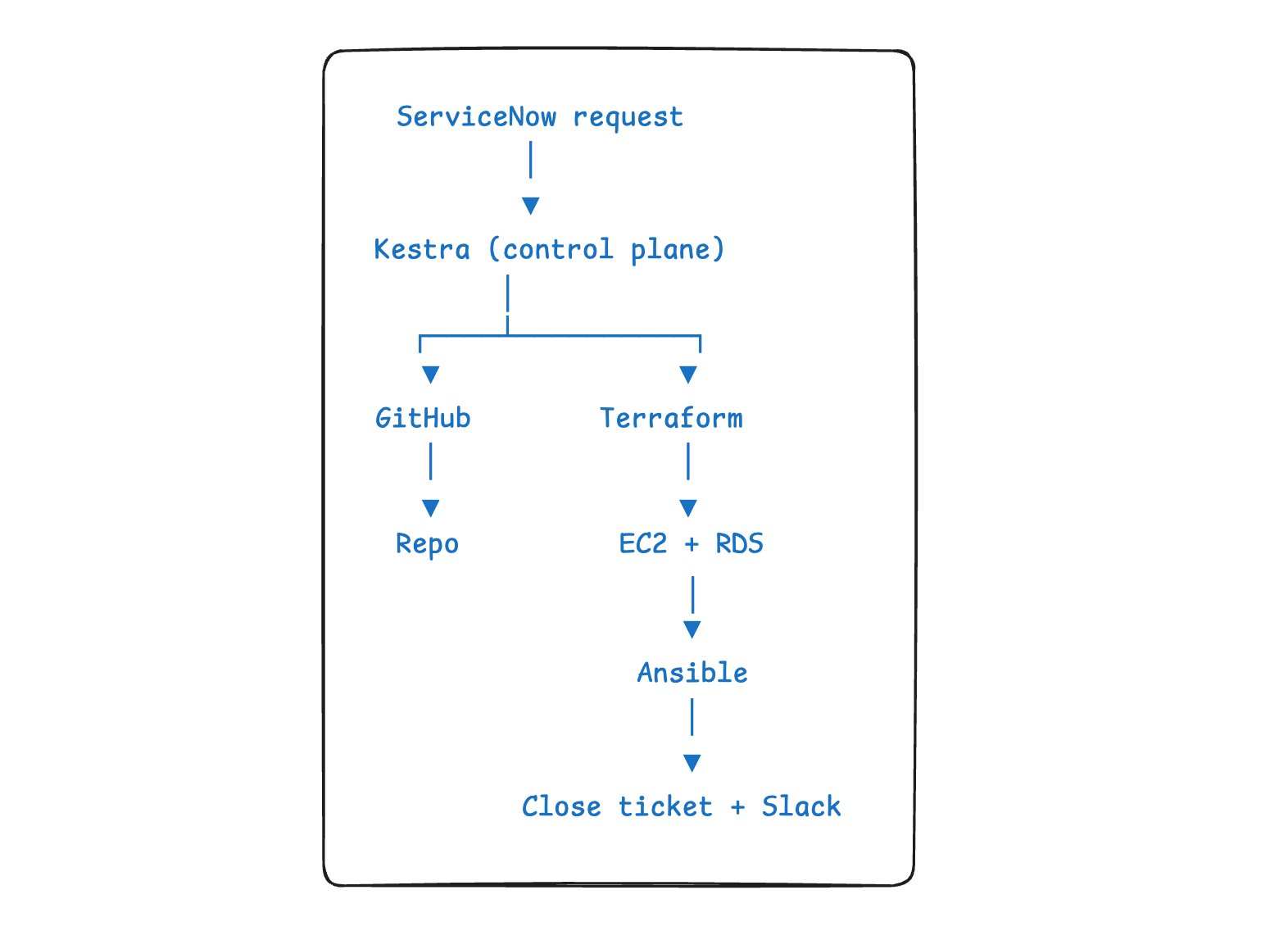
A developer raises a ServiceNow request. That single request kicks off the entire workflow: creating the GitHub repository, provisioning infrastructure from Terraform modules, waiting for production approval, configuring the application with Ansible, notifying the team on Slack, and finally updating and closing the ServiceNow ticket.
One request in. One completed workflow out. Humans only step in when approval is needed, not to babysit every step.
You run Kestra with just one command, given you have Docker on your laptop.
docker run - pull=always - rm -p 8080:8080 \
-v /var/run/docker.sock:/var/run/docker.sock \
kestra/kestra:latest server local
Open http://localhost:8080, and you have the editor, execution history, and the full UI. Kestra lets you build everything as code and from the UI.
The request comes in
Let’s start where the real request starts. Not in a chat message, but as a ServiceNow ticket that Kestra watches for.
id: provision-service
namespace: platform
inputs:
- id: repository
type: STRING
- id: environment
type: SELECT
values: [dev, staging, prod]
triggers:
- id: from_servicenow
type: io.kestra.plugin.servicenow.Trigger
domain: “{{ secret(’SERVICENOW_DOMAIN’) }}”
username: “{{ secret(’SERVICENOW_USER’) }}”
password: “{{ secret(’SERVICENOW_PASSWORD’) }}”
table: incident
This is where orchestration begins. A new ServiceNow ticket automatically kicks off the workflow.
Step 1: Create the repository
The first thing the flow does is create the GitHub repo.
tasks:
- id: create_repo
type: io.kestra.plugin.core.http.Request
uri: “https://api.github.com/orgs/livingdevops/repos”
method: POST
contentType: application/json
headers:
Authorization: “Bearer {{ secret(’GITHUB_TOKEN’) }}”
body: |
{ “name”: “{{ inputs.repository }}”, “private”: true, “auto_init”: true }
There’s nothing complicated happening here. It’s just a GitHub API call.
The GitHub token comes from Kestra’s secret store, so nothing sensitive lives in the workflow itself. And auto_init creates the first commit immediately, which means the main branch exists for everything that comes next
Step 2: Lock the branch down
Creating a repository is easy. Creating it with the right guardrails is the part people forget. Branch protection is usually a manual step, which means it eventually gets skipped.
Put it in the workflow, and it happens every single time.
- id: protect_main
type: io.kestra.plugin.core.http.Request
uri: “https://api.github.com/repos/livingdevops/{{ inputs.repository }}/branches/main/protection”
method: PUT
contentType: application/json
headers:
Authorization: “Bearer {{ secret(’GITHUB_TOKEN’) }}”
body: |
{
“required_pull_request_reviews”: { “required_approving_review_count”: 1 },
“required_status_checks”: null,
“enforce_admins”: true,
“restrictions”: null
}
Tasks run in the order you define them. If create_repo fails, the workflow doesn’t blindly continue. It stops exactly where it should, so you don’t end up with half-finished work or repositories missing their security controls.
→ Clone the GitHub repository provisioning blueprint to try this piece on its own.
Step 3: Provision the infrastructure, with a human in the loop
Now that we have the repo, let’s do the infra provisioning work.
- id: plan
type: io.kestra.plugin.terraform.cli.TerraformCLI
namespaceFiles:
enabled: true
outputFiles:
- “tfplan”
beforeCommands:
- terraform init
commands:
- terraform plan -var=”environment={{ inputs.environment }}” -out=tfplan
env:
AWS_ACCESS_KEY_ID: “{{ secret(’AWS_ACCESS_KEY_ID’) }}”
AWS_SECRET_ACCESS_KEY: “{{ secret(’AWS_SECRET_ACCESS_KEY’) }}”
AWS_DEFAULT_REGION: “ap-south-1”
- id: approval
type: io.kestra.plugin.core.flow.Pause

- id: apply
type: io.kestra.plugin.terraform.cli.TerraformCLI
namespaceFiles:
enabled: true
inputFiles:
tfplan: “{{ outputs.plan.outputFiles[’tfplan’] }}”
beforeCommands:
- terraform init
commands:
- terraform apply -auto-approve tfplan
env:
AWS_ACCESS_KEY_ID: “{{ secret(’AWS_ACCESS_KEY_ID’) }}”
AWS_SECRET_ACCESS_KEY: “{{ secret(’AWS_SECRET_ACCESS_KEY’) }}”
AWS_DEFAULT_REGION: “ap-south-1”
Two things worth noticing in the flow.
The Terraform code comes from Namespace Files, and the same plan that gets reviewed is the one that gets applied.
Pause waits for human approval. Review the plan, click Resume, and the workflow continues. Every approval is recorded.
This is where automation becomes orchestration.
Step 4: Configure the server, and stop guessing at sleep
Infrastructure takes time to become usable. Instead of adding sleep 60 and hoping for the best, Kestra retries only this task until it’s ready.
- id: configure
type: io.kestra.plugin.ansible.cli.AnsibleCLI
containerImage: cytopia/ansible:latest-tools
namespaceFiles:
enabled: true
retry:
type: constant
interval: PT30S
maxAttempt: 5
commands:
- ansible-playbook -i inventory/{{ inputs.environment }}.ini configure-app.yml
Terraform doesn’t run again. Only the failed Ansible task retries until it succeeds.
→ See the full Terraform orchestration patterns, including scheduled drift detection.
Step 5: Close the loop
The infra is up and configured. The workflow finishes by notifying the team and closing the ServiceNow ticket.
- id: notify
type: io.kestra.plugin.notifications.slack.SlackIncomingWebhook
url: “{{ secret(’SLACK_WEBHOOK’) }}”
payload: |
{ “text”: “{{ inputs.repository }} is provisioned in {{ inputs.environment }} and healthy.” }
- id: close_ticket
type: io.kestra.plugin.servicenow.Post
domain: “{{ secret(’SERVICENOW_DOMAIN’) }}”
username: “{{ secret(’SERVICENOW_USER’) }}”
password: “{{ secret(’SERVICENOW_PASSWORD’) }}”
table: incident
data:
state: “6”
close_notes: “Provisioned by Kestra. Execution {{ execution.id }}”
One ticket came in. One workflow handled everything.
I’ve seen teams stitch this together across ServiceNow, Jenkins, and vRA. Here it’s just one YAML workflow.
The Day-2 job nobody remembers: verifying backups
Provisioning is the fun half. Platform teams also own the boring half, and one of the most neglected jobs is making sure backups actually work.
A backup you’ve never restored isn’t really a backup. It’s just something you hope works. So let’s fix that too.
id: verify-backup
namespace: platform

tasks:
- id: restore
type: io.kestra.plugin.aws.cli.AwsCLI
accessKeyId: “{{ secret(’AWS_ACCESS_KEY_ID’) }}”
secretKeyId: “{{ secret(’AWS_SECRET_ACCESS_KEY’) }}”
region: ap-south-1
commands:
- aws rds restore-db-instance-from-db-snapshot - db-instance-identifier verify-{{ execution.id }} - db-snapshot-identifier prod-latest
- aws rds wait db-instance-available - db-instance-identifier verify-{{ execution.id }}
- id: validate
type: io.kestra.plugin.jdbc.postgresql.Query
url: “jdbc:postgresql://verify-{{ execution.id }}.ap-south-1.rds.amazonaws.com:5432/app”
username: “{{ secret(’DB_USER’) }}”
password: “{{ secret(’DB_PASSWORD’) }}”
sql: SELECT COUNT(*) AS users FROM users
fetchOne: true

- id: cleanup
type: io.kestra.plugin.aws.cli.AwsCLI
accessKeyId: “{{ secret(’AWS_ACCESS_KEY_ID’) }}”
secretKeyId: “{{ secret(’AWS_SECRET_ACCESS_KEY’) }}”
region: ap-south-1
commands:
- aws rds delete-db-instance - db-instance-identifier verify-{{ execution.id }} - skip-final-snapshot
errors:
- id: page_oncall
type: io.kestra.plugin.notifications.slack.SlackIncomingWebhook
url: “{{ secret(’SLACK_WEBHOOK’) }}”
payload: |
{ “channel”: “#oncall”, “text”: “Backup restore FAILED. Execution {{ execution.id }}” }
triggers:
- id: nightly
type: io.kestra.plugin.core.trigger.Schedule
cron: “0 2 * * *”
The schedule is just the trigger. The real work starts after that.
The workflow restores the latest backup, runs a validation query, cleans everything up, and only alerts the team if something goes wrong. That’s the difference between having backups and knowing they actually work.
One small note: in production, the restored database endpoint would come from the restore step instead of being hardcoded. Kestra can pass that output to the next task automatically.
What makes this work at scale
Everything looks simple when you have two workflows. The real challenge starts when you have two hundred, owned by different platform teams.
That’s where features like Namespaces and RBAC matter. Every team gets its own workflows, secrets, and permissions. And when a Terraform plan needs approval, only the right people can approve it.
The same workflow doesn’t have to live in one environment either. With Task Runners, the YAML stays the same whether it runs on your laptop, Kubernetes, on-prem, or even an air-gapped network.
Finally, every execution leaves behind an audit trail. Inputs, logs, approvals, retries, and outputs are all recorded. Three weeks later, if someone asks why a deployment failed, you open one execution instead of digging through Jenkins logs, shell scripts, and Slack messages.
Final words
Look back at what we built. There wasn’t anything revolutionary about it.
- We called a few APIs.
- Ran Terraform.
- Configured a server with Ansible.
- Verified a backup.
Any experienced engineer could script those tasks.
The difficult part was never the tasks themselves. It was making them work together reliably.
Today it’s Terraform and Ansible.
Tomorrow it might be a Kubernetes deployment, a security scan, or a compliance check.
The tools will change. The workflow won’t.
How to start with Kestra
Don’t rewrite your automation. Pick one workflow your team already runs.
The one that breaks most often, needs the most manual handoffs, and put that workflow in YAML.
- → Clone blueprint: https://fandf.co/4hfjNtw
- → GitHub: https://fandf.co/3QlzEMj
It’s open source and self-hosted, so the same workflows run on your laptop, your VPC, on-premises, or even in air-gapped environments.
Disclaimer: Kestra sponsored this article. All opinions and examples are my own.
