
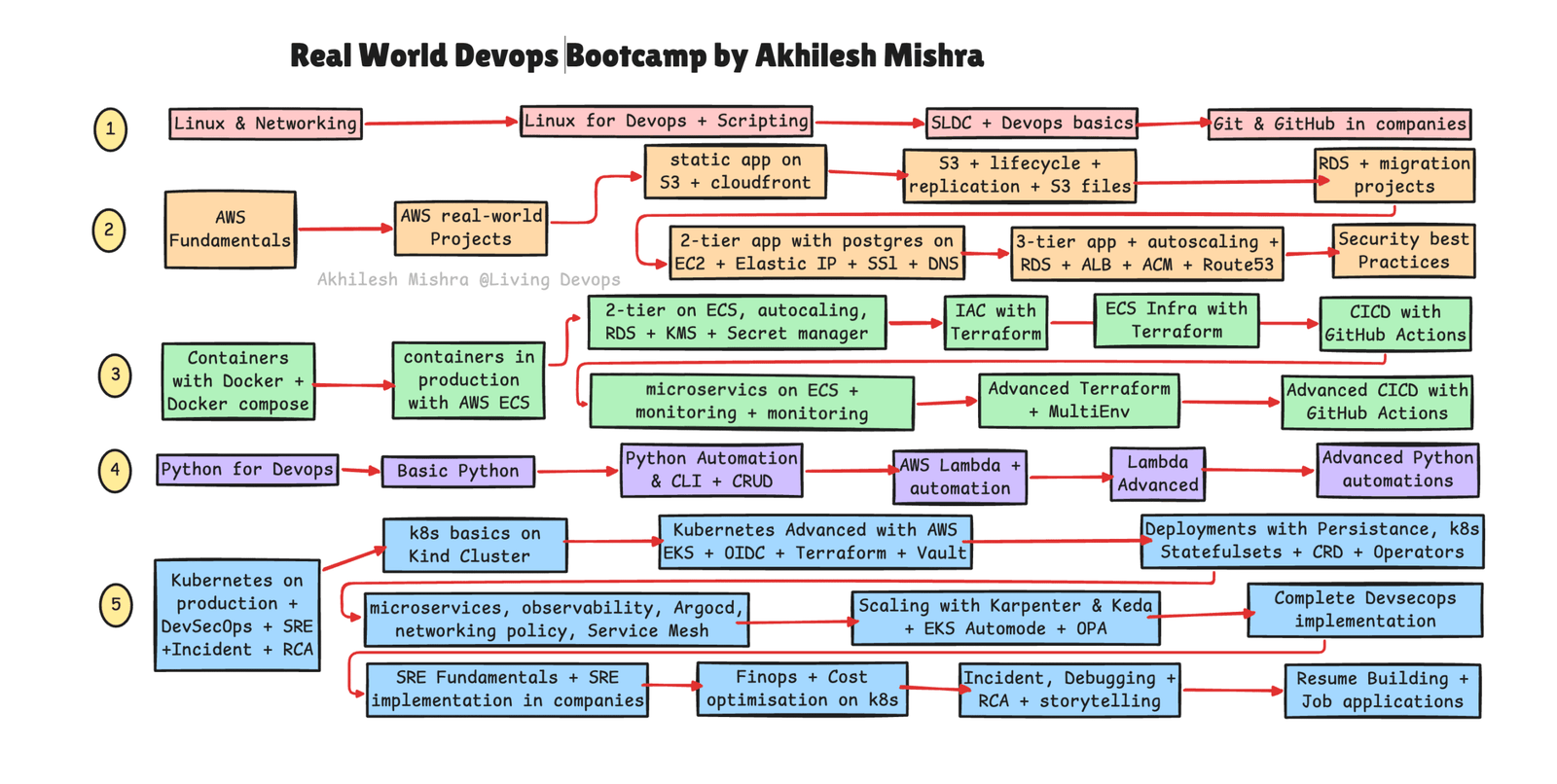
Search for “DevOps Roadmap” on LinkedIn, YouTube, or X and you’ll find hundreds of different versions. Most of them look impressive. Most of them are also built by people who never actually transitioned into DevOps themselves.
I did.
After spending 9 years in Linux support, I moved into DevOps and eventually trained more than 400 engineers through Living DevOps bootcamps. Many have already landed DevOps roles, while others are actively preparing for interviews and production environments.
The problem is that the DevOps roadmap that worked in 2022 no longer works in 2026.
AI has changed how engineers work. Cloud platforms have evolved. Kubernetes has matured. Companies now expect engineers to understand automation, security, observability, and cost optimization from day one.
This DevOps roadmap for 2026 is designed around what companies are actually hiring for today.
Whether you’re a fresher, a system administrator, a developer, a cloud engineer, or someone switching careers, this roadmap shows the exact skills, projects, and learning sequence I would follow to become a DevOps engineer in 2026.
Looking to upskill in Devops, SRE, MLOps, AIOps, then consider my upcoming real-world DevOps bootcamps. 30% discount till June 15th
20-Week Real World AWS DevOps Bootcamp with K8s, DevSecOps and SRE
28-Week Real World AWS DevOps Bootcamp with MLOps and AIOps
Before You Start: Remember Two Rules
Rule 1: One thing at a time. Most people fail because they open 12 tabs — Docker, Kubernetes, Terraform, Python — and learn nothing. Finish one. Then move.
Rule 2: Use AI from day one. In your editor (Cursor or VS Code + Copilot). In your CLI (Claude Code or Copilot CLI). Not to copy-paste answers. As a senior engineer who never sleeps. The engineers pulling ahead in 2026 use AI as a thinking partner. The ones falling behind treat it as a crutch — or ignore it.
That’s it. Let’s go.
1. Linux — 1 week to get comfortable
Like most people, I’ll start with Linux. But I’m not going to study it like a Linux admin.
I just want one week to get comfortable. If you already have Linux experience, skip this.
What to cover:
- File system —
/etc,/var,/home,/tmpand what lives where - Daily commands —
ls,cd,cp,mv,rm,find,grep - Permissions —
chmod,chown, and what755actually means - Processes —
ps,top,htop,kill,systemctl - Logs —
journalctl,/var/log/* - Disk and memory —
df,du,free,lsof - Package managers —
apt,yum,dnf - SSH + key-based auth — how you’ll connect to every server you ever manage
- Vim basics — you will get stuck in it one day, be ready
That’s it. Don’t go deeper. You’re not running a data center. Linux is the base for everything that comes next.
2. Networking — 3-4 days
Most “DevOps engineers” fail networking interview questions because they skipped this.
Don’t skip it.
- TCP/IP, ports, sockets — what actually happens when a browser hits your app
- DNS — A, CNAME, MX, TTL, how resolution works
- Subnetting — read
10.0.0.0/16and know what it means ping,curl,dig,nslookup,ss,traceroute- Firewalls, security groups, NACLs
- Load balancers — L4 vs L7
3-4 days. Concept-level. You’ll apply all of this in the cloud section.
3. Git & GitHub — 3-4 days
Every DevOps workflow starts with git push. If you can’t use Git in a team, you can’t work in DevOps.
init,clone,add,commit,push,pull,status- Branching, merging, rebasing
- Merge conflicts — how to actually resolve them
.gitignore— what it protects you from- Pull requests, code reviews, branch protection
- GitHub Actions awareness (you’ll go deep later)
Don’t learn Git like a solo developer. Learn it like someone working on a team of 20.
4. AWS — 1 month (go deep)
This is where most roadmaps go wrong. They jump to Docker before cloud.
You can’t understand containers until you understand where they run.
Pick one cloud. Go deep. The concepts transfer.
I recommend AWS — biggest market share, most jobs. If your region or company uses GCP or Azure, start there.
Week 1 — Fundamentals:
- IAM — users, roles, policies, least privilege (this is the foundation)
- EC2 — virtual machines
- VPC — public/private subnets, route tables, NAT, IGW
- S3 — object storage, lifecycle, replication
- RDS — managed databases
- Route 53 — DNS
- CloudWatch — logs and metrics
Week 2-4 — Real projects, no tutorials:
- Static site on S3 + CloudFront with custom domain and TLS
- Custom VPC from scratch with bastion host
- 2-tier app on EC2 with Postgres, Elastic IP, SSL, DNS
- 3-tier app with autoscaling, RDS, ALB, ACM, Route 53
- RDS migration between regions
Reading about VPCs does nothing. Building them teaches you everything.
By the end of Month 1, you’ve built production-grade infrastructure by hand. Now you’re ready for containers.
5. Docker — 1 week
Master Docker before you touch Kubernetes. Kubernetes is Docker at scale. If you don’t get the unit, you won’t get the orchestrator.
- Containers vs VMs — the real difference
- Images, containers, registries
- Writing your first Dockerfile
- Multi-stage builds and why image size matters in production
- Docker networking — bridge, host, none
- Volumes — how data survives a restart
- Docker Compose — multi-container apps locally
- Pushing to ECR
One week. Build, run, break, fix.
6. Containers in Production with AWS ECS — 2 weeks
Here’s the part most roadmaps get wrong.
You should run containers in production on ECS before you ever touch Kubernetes.
ECS teaches you task definitions, services, load balancer wiring, autoscaling, and rolling deployments — the same concepts you’ll need in Kubernetes — without the operational pain.
- ECS clusters — Fargate vs EC2 launch types
- Task definitions and services
- ALB → Target Group → ECS service
- Auto scaling on CPU and request count
- 2-tier app on ECS with RDS, KMS, Secrets Manager
- Microservices on ECS with monitoring
When you finally hit Kubernetes in Month 5, half the concepts will already feel familiar.
7. Terraform — 2 weeks
If your infrastructure isn’t in code, it doesn’t exist.
You can’t reproduce it. You can’t review it. You can’t collaborate on it.
- HCL — providers, resources, variables, outputs, locals
- The workflow —
init,plan,apply,destroy - Remote state with S3 + DynamoDB locking — never commit state to Git
- Modules — write once, use everywhere
- Data sources — read existing infrastructure
The project that locks it in: Take everything you built manually in AWS — VPC, RDS, ALB, ECS — and rebuild it all in Terraform. Delete everything. Rebuild in under a minute.
That feeling is IaC.
Then go deeper — multi-environment Terraform (dev, staging, prod) and your own private modules.
8. CI/CD with GitHub Actions — 1 week
Every git push should trigger something automatic. No humans clicking buttons.
- Workflow YAML — jobs, steps, actions
- Secrets and environment variables — never hardcode credentials
- Matrix builds, reusable workflows
- OIDC authentication with AWS — no long-lived access keys. This is the 2026 standard.
- Build → scan with Trivy → push to ECR → deploy to ECS
- Approvals, environment protection, blue-green and canary
Project: End-to-end pipeline. Code push → image build → security scan → registry push → ECS deploy. Zero manual steps.
9. Python for DevOps — 2 weeks
DevOps engineers who only write YAML hit a ceiling fast.
You don’t need to become a developer. You need enough Python to automate the boring stuff and call cloud APIs.
- Basics — variables, functions, loops, error handling, logging
- JSON, YAML, files, env vars
subprocess, HTTP requests- boto3 — the AWS SDK
argparse— proper CLI tools
Build something real: a script that audits IAM permissions, finds unused EBS volumes, or rotates secrets. Then turn it into a CLI tool your team can actually use.
10. AWS Lambda + Serverless — 1 week
Lambda eliminates infrastructure for event-driven work.
- Functions, triggers, event sources (S3, SQS, EventBridge, API Gateway)
- Environment variables, layers, cold starts
- Step Functions for workflows
Use cases that actually matter: auto-tag resources on creation, auto-stop dev environments at night, send cost anomaly alerts to Slack.
By the end of Step 10, you have real automation skills. Now you’re ready for Kubernetes.
11. Kubernetes Basics on Kind — 1 week
Local first. Kind runs Kubernetes in Docker. No cloud cost.
- Why Kubernetes exists — and why Docker Compose isn’t production
- Cluster architecture — control plane, etcd, scheduler, kubelet
- Pods, ReplicaSets, Deployments — the difference
- Services — ClusterIP, NodePort, LoadBalancer
- ConfigMaps and Secrets
- Namespaces
kubectl—get,describe,logs,exec,apply
One week, hands-on. No production yet.
12. Kubernetes on AWS EKS — 3 weeks
This is where production Kubernetes lives.
Week 1 — EKS basics:
- Provision EKS with Terraform — VPC, node groups, addons
- IRSA with OIDC — the modern way to give pods AWS permissions
- Helm — the package manager for Kubernetes
- ArgoCD — GitOps done right
- External Secrets Operator — sync secrets from AWS Secrets Manager or Vault
- HashiCorp Vault — when and why
Week 2 — Stateful workloads + extending the cluster:
- StatefulSets for Postgres, Kafka, anything with stable identity
- Persistent Volumes, PVCs, StorageClasses
- CloudNativePG for Postgres on Kubernetes
- DaemonSets, Jobs, CronJobs
- Custom Resource Definitions (CRDs)
- Kubernetes Operators
Week 3 — Production-grade Kubernetes:
- Prometheus + Grafana — PromQL, dashboards that tell a story, not just show numbers
- Loki + Grafana — structured logging at scale
- OpenTelemetry — the 2026 standard for tracing
- Alertmanager — alerts without alert fatigue
- Network Policies — deny by default
- Karpenter — intelligent node autoscaling (Cluster Autoscaler is dead)
- KEDA — scale on anything: queue depth, custom metrics, database rows
- EKS Auto Mode — AWS’s managed compute
- OPA / Kyverno — policy as code
- Service mesh awareness — Istio or Linkerd
The project that ties it all together: A production 3-tier app on EKS. React frontend, backend API, Postgres database. Provisioned in Terraform. Deployed via ArgoCD. Secrets via External Secrets. Autoscaled by Karpenter and KEDA. Observable via Prometheus, Grafana, and Loki.
This is the closest thing to what you’ll build on Day 1 of a real DevOps job.
13. DevSecOps — 1 week
Security is not a phase at the end of your pipeline. It’s woven into every stage.
- Container scanning — Trivy in CI, block on critical CVEs
- IaC scanning — Checkov on Terraform, before
applyruns - Secrets detection — Gitleaks + pre-commit hooks
- SAST — SonarQube or Semgrep
- Dependency scanning — Dependabot, OWASP Dependency-Check
- Supply chain — Cosign for signing images
- Kubernetes security — Pod Security Standards, Network Policies, Falco
- Cloud posture — AWS Security Hub, IAM Access Analyzer
Wire all of this into your existing GitHub Actions pipeline. Make security gates fail the build on critical findings.
14. SRE — SLI/SLO + Incident Response — 1 week
Companies don’t hire people who know tools. They hire people who know what to do when tools break.
- SLI, SLO, SLA — these three will make you sound senior in any interview
- Error budgets — having a budget for risk is a feature, not a bug
- The four golden signals — latency, traffic, errors, saturation
- Incident lifecycle — detection, triage, mitigation, resolution, postmortem
- Blameless postmortems — fix the system, not the person
- 5 Whys — find the root cause, not the symptom
- Runbooks — every alert needs one
Practice incidents. Have AI simulate one. “You are a Prometheus alert firing for high error rate. I’m the on-call engineer. Begin.” Run through it.
15. FinOps + Cost Optimisation — 1 week
Engineers who understand cost are engineers companies want. Most teams spend 20-40% more on cloud than they need to.
- Pricing models — on-demand, reserved, spot, savings plans
- OpenCost / Kubecost — per-namespace cost breakdown inside Kubernetes
- AWS Cost Explorer + Compute Optimizer
- Right-sizing over-provisioned resources
- Karpenter + KEDA for cost (scaling down is the cheapest scaling)
- Spot instances for non-critical workloads
- Storage cost traps — unused EBS, unattached EIPs, old snapshots, orphaned ELBs
- Tagging strategy + budget alerts
Build something practical: a Python tool that finds orphaned resources across your AWS accounts and posts a weekly cost report to Slack.
16. Resume, Portfolio, Interviews — 2 weeks
You’ve spent 5 months building real skills. Now you translate them into a job.
Resume:
- Quantify everything. “Reduced deployment time by 60%” beats “improved deployment process.”
- Lead with impact, not tools. Companies don’t care which CI/CD tool you used. They care what you delivered.
- ATS-friendly formatting. No tables. No graphics.
GitHub portfolio:
- Every project needs a README — problem, solution, architecture, how to run.
- Architecture diagrams. One clear diagram replaces 500 words.
- Clean commit history. Meaningful messages.
Content:
- Write 2-3 blog posts on Medium, Substack, or dev.to about what you built.
- One post per major project — problem, decisions, what broke, what you learned.
- This is your portfolio, your SEO, and your interview prep, all at once.
Interviews — practice scenarios, not trivia:
- “A pod is in CrashLoopBackOff. Walk me through your investigation.”
- “Your Terraform apply destroyed a production database. What now?”
- “Your deployment broke production at 2 am. What do you do and in what order?”
- “How would you migrate a monolith to microservices on Kubernetes?”
Run full mock interviews with AI. After each answer, ask: “What was strong, what was weak, what did I miss?”
Storytelling — the skill nobody talks about:
The best engineer in the room often loses offers to people who explain themselves better.
Use the STAR method. Explain what you built, why you decided that way, what you learned — in terms a non-technical hiring manager can follow.
The Seven Rules That Actually Matter
- One tool at a time. Resist LinkedIn. Ignore the noise.
- Cloud before containers. You can’t understand Docker without understanding where it runs.
- ECS before Kubernetes. Run containers in production on something simple first.
- Automate as you go. If you’re still clicking, you’re not done.
- Security and cost are not optional. They separate engineers companies trust from engineers they just use.
- Projects beat tutorials. Every time. Build things that break. Fix them. That’s the job.
- Certifications help. Projects get you hired. Stories close the deal.
Final Thoughts on This DevOps Roadmap
There is no shortage of DevOps roadmaps on the internet.
What most people need is not another list of tools. They need a clear path that connects skills, projects, and real-world experience.
This DevOps roadmap focuses on building practical experience with Linux, AWS, Docker, Kubernetes, Terraform, CI/CD, DevSecOps, SRE, and FinOps in the same order you’ll encounter them in real production environments.
If you follow this roadmap consistently for the next six months, you’ll have something far more valuable than certifications.
You’ll have projects, stories, troubleshooting experience, and the confidence that comes from building systems that actually work.
Want to go faster with live sessions, real production setups, and a small cohort of serious engineers? Consider these paths
20-Week Real World AWS DevOps Bootcamp with K8s, DevSecOps and SRE
28-Week Real World AWS DevOps Bootcamp with MLOps and AIOps
Thanks for reading Living Devops with Akhilesh! Subscribe for free to receive new posts and support my work.
